AWS Lambdaを活用して、OpenWeatherMap APIから天気情報を取得するアプリケーションを作っています。
この記事では以下を行います。
1. Lambda用のロジックの改善
OpenWeatherMap APIから天気情報を取得するためのAPIキーを事前にAWSのParameter Storeに保存しており、そのAPIキーの取得方法について、boto3を使うか、TerraformでParameter Storeを定義するかを検討しました。
それぞれのメリット・デメリットは以下のようになると思います。
boto3
Terraform
今回はローカル開発と本番環境の動作を統一しやすいboto3を採用しました。
Pythonのファイルは以下のようになっています。
import json
import requests
import boto3
from mypy_boto3_ssm import SSMClient
import os
import logging

logging.basicConfig(level=logging.INFO)
logger = logging.getLogger(__name__)

def get_weather(api_key, location):
    url = f'https://api.openweathermap.org/data/2.5/weather?q={location}&appid={api_key}&units=metric'

    try:
        response = requests.get(url)
        response.raise_for_status()
        weather_data = response.json()

        temperature = weather_data['main']['temp']
        weather_description = weather_data['weather'][0]['description']

        return {
            'temperature': temperature,
            'description': weather_description
        }

    except requests.exceptions.RequestException as e:
        return {'error': str(e)}
    except Exception as e:
        return {'error': str(e)}

def get_api_key():
    profile_name = os.getenv('AWS_PROFILE')
    session = boto3.Session(profile_name=profile_name)

    ssm: SSMClient = session.client('ssm', region_name='ap-northeast-1')

    response = ssm.get_parameter(
        Name='/weather-checker/api-key',
        WithDecryption=True
    )
    return response['Parameter']['Value']

def lambda_handler(event, context):
    api_key = get_api_key()
    location = 'Naha,Okinawa,JP' # 天気情報を取得したい場所。値は外部から受け取れるように変更予定

    weather_info = get_weather(api_key, location)

    if 'error' in weather_info:
        logger.error(f"Failed to fetch weather data: {weather_info}")
        return {
            'statusCode': 500,
            'body': json.dumps(weather_info)
        }

    logger.info(f"Successfully fetched weather data: {weather_info}")


    return {
        'statusCode': 200,
        'body': json.dumps({
            'location': location,
            'temperature': weather_info['temperature'],
            'description': weather_info['description']
        })
    }

if __name__ == "__main__":
    result = lambda_handler(None, None)
    print(result)
2. AWSで必要なリソースの確認
Lambdaを動作させるために必要なリソースとして、以下が必要になると考えています。
- Lambda: メインのコードを実行するリソース。
- ECRリポジトリ: Dockerイメージをホスティングするためのリソース。今回はLambdaをコンテナ形式で実行するため必要になる。
- CloudWatch: 処理に関連するログを出力するロググループなどが必要になる想定。また、後からLambdaをスケジュール実行で動かす時はCloudWatch eventsが必要になる。
- IAM関連: IAM Roleやポリシーなどで適切な権限設定を行う。
3. ECRリポジトリのTerraform構築
まず、簡単に作成できるECRリポジトリをTerraformで定義しました。Terraformコードでは、ECRに対してイメージのスキャンを有効にし、リポジトリの暗号化設定はデフォルトのままにしています。
resource "aws_ecr_repository" "weather_checker" {
  name                 = "weather-checker"
  image_tag_mutability = "MUTABLE"

  image_scanning_configuration {
    scan_on_push = true
  }

  tags = {
    Environment = "Production"
    Project     = "WeatherChecker"
  }
}
terraform planコマンドでリソースの内容に問題ないことを確認し、terraform applyで適用を行いました。
4. AWS CLIでリソース確認
terraform applyを実行してリソースをデプロイした後、以下のAWS CLIコマンドを使用してECRリポジトリの存在を確認しました。
aws ecr describe-repositories --repository-names weather-checker --region ap-northeast-1
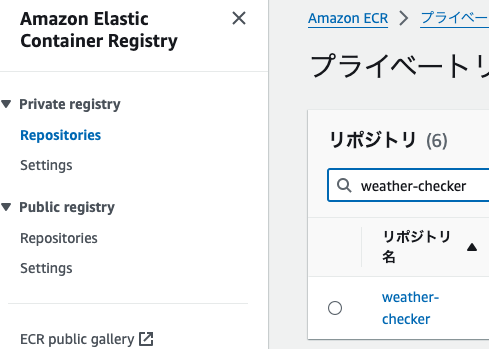
CLIの出力結果で想定通りECRリポジトリが作成されていることが確認できました。
マネジメントコンソールからも以下のように確認できました。
5. この後、Lambdaを実行するために必要な作業の確認
次のステップとして、以下のような作業を行う予定です。
- Lambda、CloudWatch、IAMをTerraformで定義しapply
- DockerfileからDockerイメージをビルドしECRにプッシュする仕組みを構築(local-execが使えるっぽい?)
- Lambdaの実行確認
進めながら見落としなどに気づくかも知れませんが、少しずつ進めていきます。
